Skip to content
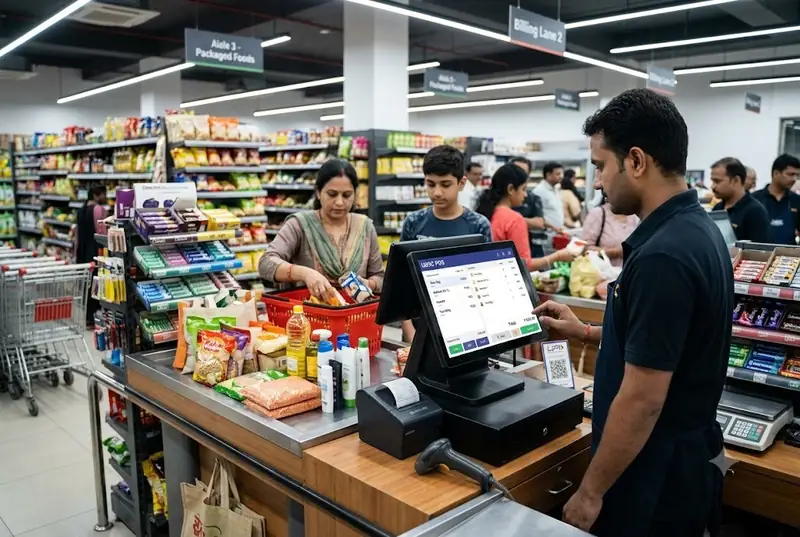
Cashier billing at a busy supermarket checkout

Grocery

Supermarket POS Software

Fast billing, live stock and clear reports for supermarkets — one system for the whole shop.

Supermarket POS runs the counter, the stock room and the reports from one place — barcode billing, weight items, offers, GST and daily cash closing. Offline-first, one-time licence, no monthly fee.

Who it is for

  • Supermarkets
  • Grocery stores
  • Kirana shops

What it does

  1. Scan items
  2. apply offers & scheme
  3. collect cash / UPI / card
  4. print bill
  5. track stock & expiry

See the software

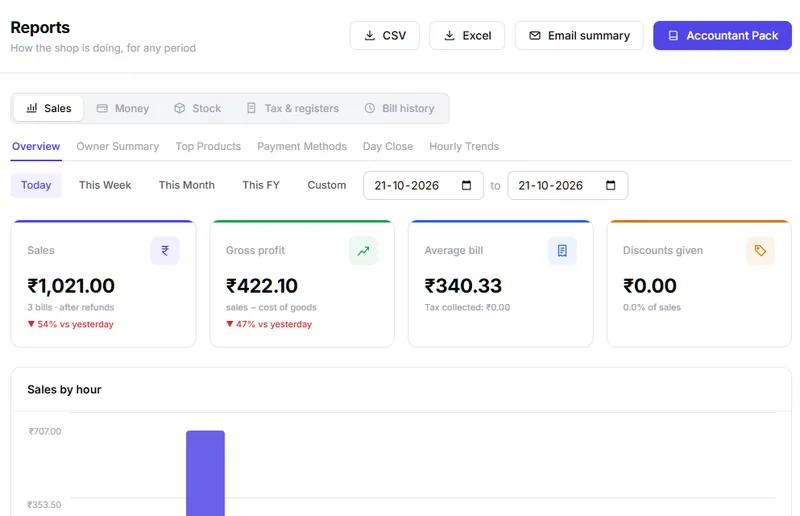
Reports screen with sales, gross profit, average bill and discounts
Reports: sales, profit and average bill for any period. Sample data.
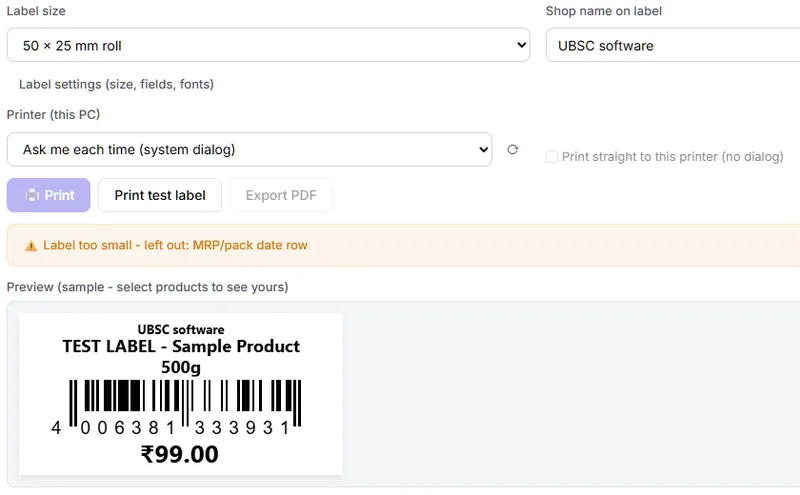
Barcode label screen with label size, printer and a preview
Barcode labels: pick a size, preview the label and print.

Modules

Dashboard
Today's sales, counters, low-stock and expiry alerts
Billing (POS)
Barcode scan, weigh-scale items, offers, split payment, reprint
Inventory
Stock in/out, batches, expiry (FEFO), minimum-level alerts
Purchases
Suppliers, purchase orders, GRN into stock
Offers & Pricing
MRP, scheme, combo and item-level discount rules
Customers
Loyalty, credit/udhaar, purchase history
Reports
Sales, stock, expiry, profit and cashier-wise reports
Users & Roles
Cashier / supervisor / owner rights with audit trail
Backup & Security
Daily local backup, role login, data stays on your machine

More features

Weighing scale input
Connect a weighing scale that works as keyboard input.
Price or weight barcodes
The till reads EAN-13 scale labels that carry the price or the weight.
Expiry and batch reports
See items near expiry, and stock broken down by batch number.

What makes it different

Bill in seconds.

Keyboard-first POS built for peak-hour queues — scan, pay, print without mouse.
Stock you can trust.

Every bill updates stock live; expiry and low-stock alerts come before the loss does.

Works without internet.

Local database — the counter never stops when the net goes down.

One-time cost.

Own your software and your data — no cloud lock-in, no monthly rent.

Reports and printouts

Reports

  • Expiry report
  • Stock by batch
  • Dead stock
  • Top products
  • Payment mix
  • GSTR-1 export

What it prints

  • Thermal bill
  • A4 GST invoice
  • Barcode labels

Staff logins

Cashier
Scans items, takes payment and prints the bill.
Supervisor and owner
Approve with a PIN. Each role has set rights.

At a glance

Runs on
Windows desktop (counter PC / laptop)
Needs
billing printer + barcode scanner — no server, no internet
Data
stored locally, with automatic daily backups
Printing
thermal bill in Tamil or English, A4 invoice, label & reports

Devices that work with it

  • Weighing scale (keyboard input)
  • 58 mm or 80 mm thermal printer
  • Barcode scanner
  • Barcode label printer

How your data is protected

  • Automatic backups, with the last 7 kept
  • Backups are encrypted and need a recovery key on another PC
  • Tamper-evident audit log, so silent edits can be detected
  • Database integrity check and Safe Mode

What your computer needs

Computer
Windows, 64-bit
Database
SQLite file on the counter PC
Internet
Not needed for billing

Supermarkets deserve billing that keeps pace with the queue and stock that always adds up.

Ready to run Supermarket POS?

Tell us about your grocery setup and we will scope it in a day.

Frequently asked questions

Does Supermarket POS handle weigh-scale items?

Yes. It bills barcode items and weigh-scale items at the same counter.

Does it track expiry?

Yes. Stock is tracked by batch and expiry, the oldest stock sells first, and alerts appear before the loss does.

Can it print bills in Tamil?

Yes. Bills can print in Tamil or English.

Does it work without internet?

Yes. It is offline-first, with a one-time licence and no monthly fee.