Skip to content
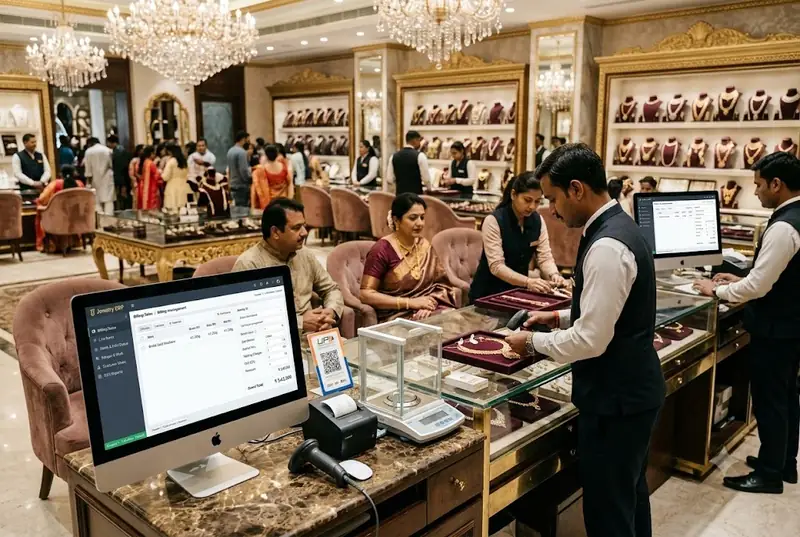
Jewellery showroom billing counter with the ERP on screen

Specialty retail

Jewelry ERP: Jewellery Shop Software

The complete showroom software for jewellery retail.

Jewelry ERP is a desktop ERP for jewellery shops with 1 or many counters. Each counter runs its own billing screen, and all counters share one central database over the shop LAN — stock, rates, customers and accounts stay in sync. From sale to karigar to khata to GST, everything lives in one place.

Who it is for

  • Jewellery showrooms with one or more counters
  • Shops with karigars
  • Shops with old-gold buy-back and chit funds

What it does

  1. Weigh with balance
  2. price with live gold rate
  3. bill in seconds
  4. take Cash / Card / UPI / Old-Gold exchange
  5. print receipt
  6. post to accounts
  7. close day tally

Modules

Dashboard
Live KPIs — today's sales, stock value, low stock, pending orders
Point of Sale
Keyboard-first billing, metal value + wastage + discount + GST + round-off, hold & recall
Payments
Cash, Card, UPI, Split payments with 269ST daily cash-limit check
Inventory
Item master with photos, stones / diamonds breakup, HUID, status flow, tray view
Stock Audit
Snapshot scan / weigh variance post, with CSV
Purchases
Purchase entry, supplier payments, returns, cost adjustments, supplier statements
Old Gold Buy-Back
Test, weigh, rate, adjust against new sale or pay out
Gold Rate Booking
Advance booking with rate protection on purchase
Chit Funds
Schemes, enrolments, collections, late fee, maturity and reminders
Custom Orders
Advance, karigar job-work, delivery and labour billing
Karigar
Issue / receive, wastage tracking, dues and settlement
Receivables (Udhar)
Layaway and credit ledger with follow-up
Accounts (GL)
Double-entry ledger, trial balance, P&L, opening balances
Expenses
Day-to-day kharcha with day-book
Reports & GST
Sales, stock, old-gold reports, GSTR-1 / 3B CSV export
Day Close
Counter-wise denomination tally and day lock
Hardware
Weighing balance, RFID tray scan, thermal receipt printer
Users & Roles
Counter login, role-wise access, full audit trail
Offline Mode
Keeps billing on during network cut, auto-syncs later

More features

Hallmarking tracker
Track pieces sent to the hallmarking centre in batches.
Branch transfers
Move a piece to another branch. It cannot be sold while it is in transit.
Sale returns
Customers can return sold items, handled as a return document.
Automatic piece tags
Each new piece gets a tag number and barcode automatically.
Stock history
Every stock move is recorded in a history that cannot be edited.
Day book
Money in and out from nine sources, in one view.
Purchase receiving board
Shows ordered against received quantity and weight for each line.
GST, HUID and cash cap settings
One settings screen controls GST rates, the HUID rule and the 269ST cash cap.

What makes it different

Built for jewellery, not general retail.

Wastage, making charge, HUID hallmarking, stone breakup and gold-rate protection are in the billing itself — not add-ons.
Counter-ready by design.

Every till runs independently but posts to one ledger. Server-side pricing means every counter bills the same correct total.

Money and stock always match.

Every sale, purchase, return and expense posts a balanced journal in the same transaction — accounts never drift from stock.

Simple for staff.

Big POS buttons, F1–F12 shortcuts, weight auto-capture — a salesman can bill within minutes.

Reports and printouts

Reports

  • Sales report
  • Stock report
  • Old gold report
  • GST report (GSTR-1 and GSTR-3B CSV)
  • Trial balance
  • Income statement (P&L)
  • Ledger drill-down and day book
  • Stock audit variance
  • Chit overdue list

Staff logins

Admin
Every screen, including settings and users.
Manager
Counter, stock, money and reports.
Sales staff
Billing, customers, orders, returns and the dashboard.
Accountant
Ledger, reports, receivables and collections.
Inventory staff
Stock, stock audits, transfers, karigars and purchases.

At a glance

Runs on
Windows desktop on each counter + one PostgreSQL server on shop LAN
Needs
no internet, no cloud, no monthly fee
Data
single central database with counter-wise security and audit log
Printing
thermal receipts in Tamil or English, A4 invoices, barcode / HUID labels

Devices that work with it

  • Weighing balance (Essae, Contech and Shinko protocols)
  • RFID reader for tray scanning
  • Thermal receipt printer

How your data is protected

  • Stock moves cannot be edited, enforced by the database
  • A sale can post to the ledger only once
  • Each counter connects with its own database role
  • Staff passwords are stored hashed
  • Changes are written to an audit log

What your computer needs

Computer
Windows 11 at each counter
Database
One PostgreSQL server on the shop LAN
Network
Counters connect over the shop LAN

Jewellery shops deserve software that weighs right, prices right and tallies every night.

Ready to run Jewelry ERP?

Tell us about your specialty retail setup and we will scope it in a day.

Frequently asked questions

Can Jewelry ERP run on more than one counter?

Yes. Each counter runs its own billing screen, and all counters share one central database over the shop LAN.

Does it handle old gold exchange?

Yes. Old gold exchange is part of billing, and there are old-gold reports.

Does it export GST data?

Yes. It exports GSTR-1 and 3B data as CSV.

Can it print bills in Tamil?

Yes. Receipts can print in Tamil or English.

Does Jewelry ERP track hallmarking?

Yes. It tracks pieces sent to the hallmarking centre in batches.

Does it check the 269ST cash limit?

Yes. There is a 269ST cash cap setting that can be switched on or off.