Skip to content
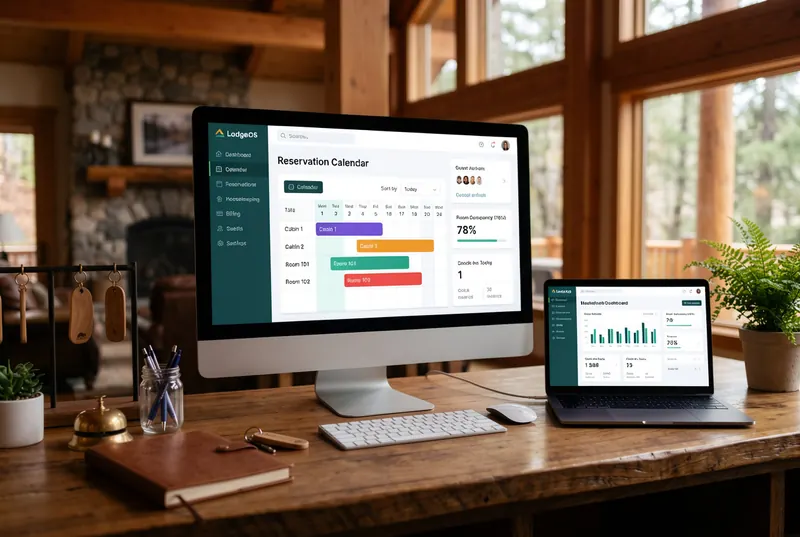
Lodge PMS reservation calendar on a reception desk

Hospitality

Lodge PMS: Lodge and Guesthouse Software

The hotel front desk that never blinks.

Lodge PMS is a complete Property Management System for small hotels, lodges and guesthouses — built to run the whole front desk from one workstation, with no separate server, no monthly cloud bill and no internet required. When the connection drops, the desk keeps trading.

Who it is for

  • Small hotels
  • Lodges
  • Guesthouses

What it does

  1. Book it
  2. check in the guest
  3. post charges to the folio
  4. take payment
  5. check out with a GST tax invoice

See the software

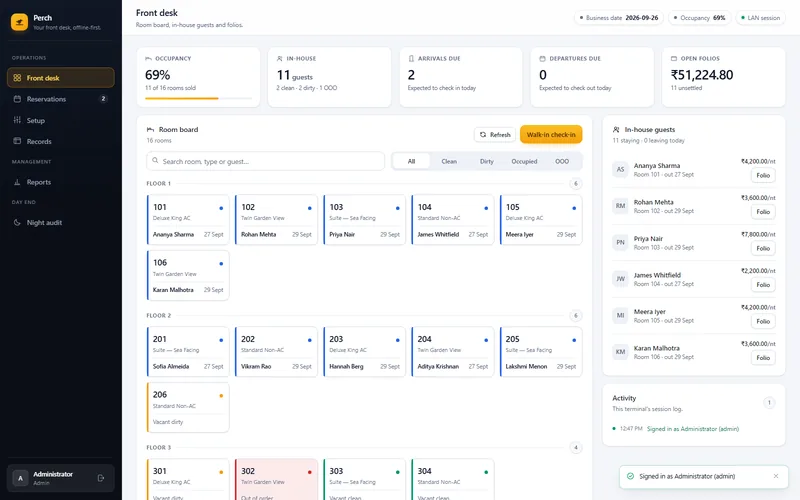
Front desk room board with occupancy, rooms by floor and in-house guests
Front desk room board, with made-up sample guests. The app shows its working name, Perch.
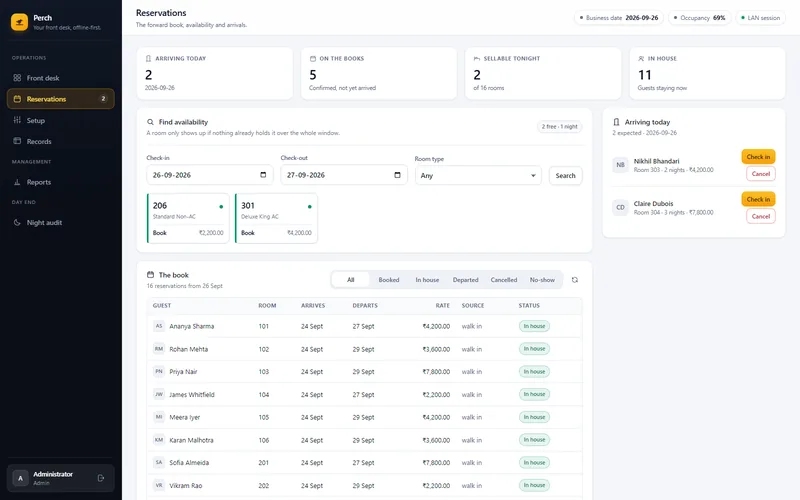
Reservations screen with availability search, arrivals today and the booking list
Reservations: search free rooms, see today's arrivals and the booking list. Made-up guests.
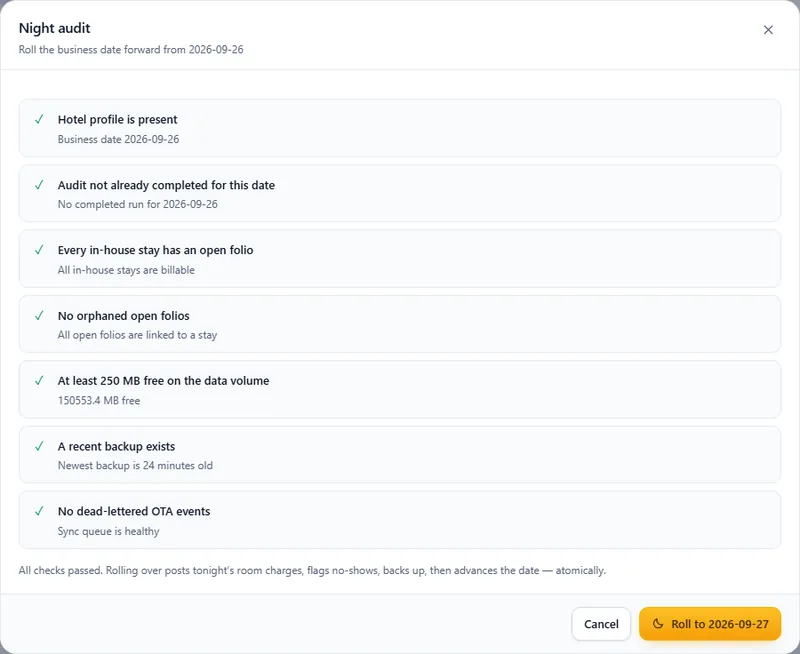
Night audit checklist with every check passed before the date moves on
Night audit: the checks run before the business date moves on.

Modules

Front Desk
Live room board, in-house guests, folio charges and payments
Reservations
The forward booking book, availability search and arrivals
Housekeeping
Cleaning task board, attendant assignment, out-of-order rooms
Rate Plans & Seasons
Seasonal and weekday pricing, meal plans, per-room-type rates
Guest CRM
Guest profiles, VIP tags, stay history, do-not-rent list
Cashier Shifts
Open a drawer with a float, record paid-outs and drops, reconcile at close
Deposits & Groups
Advance deposits on bookings, multi-room group bookings
City Ledger / Receivables
Corporate accounts, statements, ageing and credit limits
OTA Channel Sync
Link to Booking.com, Agoda and other channels through Channex, still in testing
Guest Messaging
Ready-made messages for email and WhatsApp, sent by your staff, with an outbox log
Reports
Occupancy, ADR, RevPAR, GST filing, payments, daily owner summary
Records
Tax invoices, audit trail, statutory C-Form export, verified backups
Setup
Property details, tax slabs, rooms, room types and staff accounts

More features

Rate floor
A rate below 75 percent of the room type's base rate needs a manager or admin PIN.
Lost and found
Log found items, record who claims them, and dispose of unclaimed items.
Quick charges
Save common extra charges as presets, so the desk can post them in one step.
Maintenance reports
Housekeeping staff can report a room problem and mark it resolved.
Forfeited deposit tax
A forfeited deposit is taxed at 18 percent GST and shows in the GST reports.
Other terminals
Other PCs on the same network can connect over HTTPS.

What makes it different

Works offline, always.

Everything runs on the front-desk machine. No cloud account, no port forwarding, no downtime when the internet goes.
Built for Indian hotels.

GST tax invoices with slab-wise breakdown, statutory C-Form export for foreign nationals, and INR throughout.

Guest data stays protected.

Passport and Aadhaar numbers are encrypted at rest with AES-256-GCM. The encryption key is sealed by the operating-system keychain, and the plain key is never written to disk.

Every action is on the record.

A tamper-evident audit log records who did what and why — and it cannot be edited or deleted, even by an administrator. Voids and refunds need a supervisor's PIN.

The numbers always add up.

Money is tracked in exact paise, so GST totals and folio balances never drift. Run as many terminals as you need — reception, housekeeping and the manager's desk stay in step in real time.

Reports and printouts

Reports

  • Daily flash report
  • Occupancy and performance report
  • GST report
  • Payments report
  • Owner daily summary
  • Ledger statement and receivables ageing
  • Shift report
  • Foreign-national C-Form export
  • Night audit summary

What it prints

  • Tax invoice (A4 or thermal)
  • Guest registration card
  • 58 mm and 80 mm thermal receipt
  • Daily summary
  • Ledger statement

Staff logins

Admin
Everything, including staff accounts, backups, restore and channel settings.
Manager
Night audit, reports, C-Form export and supervisor approvals.
Front desk
Check-in and check-out, charges, payments, reservations and deposits.
Housekeeping
Housekeeping tasks and maintenance reports.

At a glance

Runs on
Windows desktop
Needs
one Windows PC — no separate server, no internet at the desk
Data
stored locally, with automatic verified backups
Printing
thermal receipt, registration card, tax invoice and statement printing

Devices that work with it

  • USB or network thermal receipt printer, 58 mm or 80 mm

How your data is protected

  • Verified backup, by hand or automatically at night audit
  • Backup folder can be on a second disk, USB drive or network share
  • Guest passport, Aadhaar and visa numbers are encrypted
  • The encryption key can be exported with a password for a new PC
  • Audit log that blocks edits and deletes

What your computer needs

Computer
Windows PC
Database
SQLite file on the front-desk PC
Internet
Not needed at the front desk

Small hotels deserve software that works as hard as they do.

Ready to run Lodge PMS?

Tell us about your hospitality setup and we will scope it in a day.

Frequently asked questions

Does Lodge PMS sync with Booking.com?

Not yet in live use. A link to Booking.com, Agoda and other channels through the Channex channel manager is built and still being tested. Ask UBSC for the latest status.

Does Lodge PMS work without internet?

Yes. It runs on the front-desk machine with no cloud account, so the desk keeps trading when the internet goes down.

Does Lodge PMS create GST tax invoices?

Yes. It issues GST tax invoices with a slab-wise breakdown. It also exports the statutory C-Form for foreign nationals.

How does Lodge PMS protect guest ID numbers?

Passport and Aadhaar numbers are encrypted at rest with AES-256-GCM. The encryption key is sealed by the operating-system keychain.

Does Lodge PMS send WhatsApp messages by itself?

No. It opens WhatsApp with the message ready, and your staff press send.

Can a front desk user give a very low room rate?

A rate under 75 percent of the base rate needs a manager or admin PIN.

Where is the guest data kept?

In a database file on the front-desk PC. The backup folder can be moved to another disk or a network share.